
Vestibulum ac diam sit amet quam vehicula elementum sed sit amet dui. Proin eget tortor risus. Praesent sapien massa, convallis a pellentesque nec, egestas non nisi. Nulla quis lorem ut libero malesuada feugiat. Proin eget tortor risus.
The FEMA app is your personalized disaster resource, so you feel empowered and ready to take charge of any disaster life throws your way.
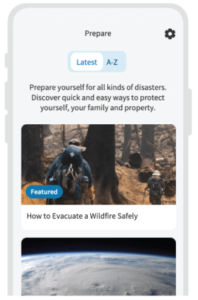
PLAN: Learn how to prepare for common hazards quickly and easily.
Whether you’re experienced or just starting out, the FEMA app can help you learn basic preparedness strategies, such as how to create a family emergency communication plan, what to pack in your emergency kit, and what to do immediately after a disaster.
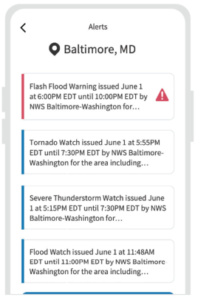
PROTECT: Knowing when and how to protect yourself, your loved ones, and your property during a disaster can make all the difference.
With the FEMA app, you can receive real-time weather and emergency alerts from the National Weather Service for up to five locations nationwide. It can also help you find a nearby shelter if you need to evacuate to a safe space.
PROTECT: Knowing when and how to protect yourself, your loved ones, and your property during a disaster can make all the difference.
With the FEMA app, you can receive real-time weather and emergency alerts from the National Weather Service for up to five locations nationwide. It can also help you find a nearby shelter if you need to evacuate to a safe space.
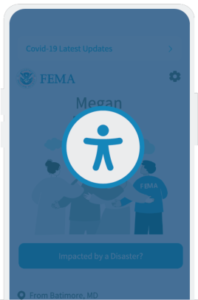
INCLUSIVE DESIGN: An app for everyone.
The FEMA app is compatible with screen reader technology (Voice Over / TalkBack). The app follows federal accessibility requirements and also includes inclusive design principles such as consistent user interfaces, plain language, and ALT text descriptions. To ensure the best screen reader experience, we recommend using iOS 11.0 and later and Android 5.0 and later.
Use FEMA text messaging to find up to three emergency shelters or FEMA Disaster Recovery Centers nearby.
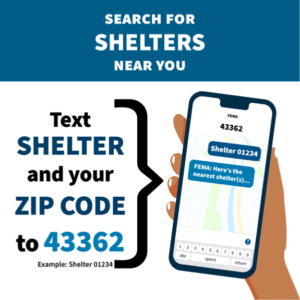
Text for Help To search for shelters near you, text SHELTER and your ZIP code to 43362 (e.g., Shelter 12345). You may also lookup shelters at any time through the American Red Cross shelter map or by downloading the FEMA App.
The 43362 Text/SMS short code currently only works within the continental U.S. and common mobile phone carriers within Puerto Rico and Guam.
For other U.S. territories, please download the FEMA App on iOS and Android (available in English and Spanish) to look up shelter and Disaster Recovery Center locations, or visit one of the links below:
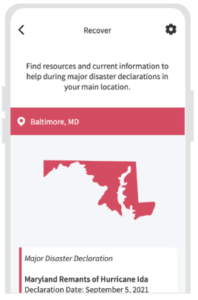
You can learn about disaster recovery resources in person at a Disaster Recovery Center.
To search for Disaster Recovery Center locations near you, text DRC and your ZIP code to 43362 (e.g., DRC 12345).
You may use our DRC Locatorat any time to search for a location near you.
Safety Tips
To sign up to receive general information about how to prepare for any type of disaster, text PREPARE to 43362. To sign up for disaster-specific safety tips, text one of the keywords below to 43362:
BLACKOUT
EARTHQUAKE
FIRE
FLOOD
HURRICANE
TORNADO
WILDFIRE
WINTER
If you would like to subscribe to more than one list, please send a separate text for each topic.
Sending STOP will automatically unsubscribe you from all lists. Message frequency may vary. Terms & Conditions and Privacy Policy.

FEMA App Promotional Toolkit The FEMA App Social Media Toolkit includes talking points, graphics, and other promotional materials..
How can I download the FEMA App?
The FEMA app is available for Android and iOS. It can be downloaded from Google Play and the Apple App Store.
You can also download the app via text messaging. On an Android device, text ANDROID to 43362 (4FEMA); On an Apple Device, text APPLE to 43362 (4FEMA).
Is the FEMA App free to download?
Yes, the FEMA app is free to use and download. Please note that if you download the app via text messaging, standard message and data rates apply.
How can I change my main location in the app?
You can update your main location in the FEMA App by:
Open Settings and select Your Main Location.
Delete your old location.
Please enter your new main location and select it.
Tap the Back arrow or Close button to save your new main location.
Mayday 3600 Calorie Emergency Food Ration Bar
This 3600-calorie emergency food bar is divided into 9 meal-sized portions, providing essential nutrition for disaster preparedness or survival situations. With a 5-year shelf life and non-thirst-provoking formula, it's a dependable and convenient solution for emergencies.
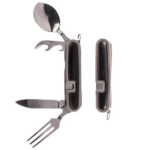
Folding Cutlery Tool by Ready Hour – You get a strong, carbon, stainless-steel knife that will cut even the toughest food. Plus, get a detachable fork and spoon. "You'll feel just like you're eating at home.
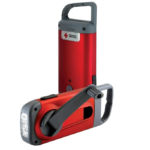
Crank-Powered Flashlight & Charger: Stay prepared with the hand-cranked Eton Clipray Flashlight, designed to provide reliable light and smartphone charging without the need for batteries.
Emergency Flashlight: Crank for 1 minute to generate 10 minutes of bright LED light, perfect for emergencies, power outages, or outdoor use.
USB Smartphone Charger: The built-in USB port charges your phone or other devices, making it an essential tool for emergencies or off-grid adventures.
Portable & Convenient: The Clipray is compact, lightweight, and equipped with a durable carabiner clip. It can be easily attached to belts, backpacks, or gear for hands-free convenience.
Officially Licensed American Red Cross Product: The Eton Clipray is an officially licensed American Red Cross product, ensuring quality and reliability and helping you stay prepared for any situation.
Vestibulum ac diam sit amet quam vehicula elementum sed sit amet dui. Proin eget tortor risus. Praesent sapien massa, convallis a pellentesque nec, egestas non nisi. Nulla quis lorem ut libero malesuada feugiat. Proin eget tortor risus.
The FEMA app is your personalized disaster resource, so you feel empowered and ready to take charge of any disaster life throws your way.
PLAN: Learn how to prepare for common hazards quickly and easily.
Whether you’re experienced or just starting out, the FEMA app can help you learn basic preparedness strategies, such as how to create a family emergency communication plan, what to pack in your emergency kit, and what to do immediately after a disaster.
PROTECT: Knowing when and how to protect yourself, your loved ones, and your property during a disaster can make all the difference.
With the FEMA app, you can receive real-time weather and emergency alerts from the National Weather Service for up to five locations nationwide. It can also help you find a nearby shelter if you need to evacuate to a safe space.
PROTECT: Knowing when and how to protect yourself, your loved ones, and your property during a disaster can make all the difference.
With the FEMA app, you can receive real-time weather and emergency alerts from the National Weather Service for up to five locations nationwide. It can also help you find a nearby shelter if you need to evacuate to a safe space.
INCLUSIVE DESIGN: An app for everyone.
The FEMA app is compatible with screen reader technology (Voice Over / TalkBack). The app follows federal accessibility requirements and also includes inclusive design principles such as consistent user interfaces, plain language, and ALT text descriptions. To ensure the best screen reader experience, we recommend using iOS 11.0 and later and Android 5.0 and later.
Use FEMA text messaging to find up to three emergency shelters or FEMA Disaster Recovery Centers nearby.
Text for Help To search for shelters near you, text SHELTER and your ZIP code to 43362 (e.g., Shelter 12345). You may also lookup shelters at any time through the American Red Cross shelter map or by downloading the FEMA App.
The 43362 Text/SMS short code currently only works within the continental U.S. and common mobile phone carriers within Puerto Rico and Guam.
For other U.S. territories, please download the FEMA App on iOS and Android (available in English and Spanish) to look up shelter and Disaster Recovery Center locations, or visit one of the links below:
You can learn about disaster recovery resources in person at a Disaster Recovery Center.
To search for Disaster Recovery Center locations near you, text DRC and your ZIP code to 43362 (e.g., DRC 12345).
You may use our DRC Locatorat any time to search for a location near you.
Safety Tips
To sign up to receive general information about how to prepare for any type of disaster, text PREPARE to 43362. To sign up for disaster-specific safety tips, text one of the keywords below to 43362:
BLACKOUT
EARTHQUAKE
FIRE
FLOOD
HURRICANE
TORNADO
WILDFIRE
WINTER
If you would like to subscribe to more than one list, please send a separate text for each topic.
Sending STOP will automatically unsubscribe you from all lists. Message frequency may vary. Terms & Conditions and Privacy Policy.
FEMA App Promotional Toolkit The FEMA App Social Media Toolkit includes talking points, graphics, and other promotional materials..
How can I download the FEMA App?
The FEMA app is available for Android and iOS. It can be downloaded from Google Play and the Apple App Store.
You can also download the app via text messaging. On an Android device, text ANDROID to 43362 (4FEMA); On an Apple Device, text APPLE to 43362 (4FEMA).
Is the FEMA App free to download?
Yes, the FEMA app is free to use and download. Please note that if you download the app via text messaging, standard message and data rates apply.
How can I change my main location in the app?
You can update your main location in the FEMA App by:
Open Settings and select Your Main Location.
Delete your old location.
Please enter your new main location and select it.
Tap the Back arrow or Close button to save your new main location.
Mayday 3600 Calorie Emergency Food Ration Bar
This 3600-calorie emergency food bar is divided into 9 meal-sized portions, providing essential nutrition for disaster preparedness or survival situations. With a 5-year shelf life and non-thirst-provoking formula, it's a dependable and convenient solution for emergencies.
Folding Cutlery Tool by Ready Hour – You get a strong, carbon, stainless-steel knife that will cut even the toughest food. Plus, get a detachable fork and spoon. "You'll feel just like you're eating at home.
Crank-Powered Flashlight & Charger: Stay prepared with the hand-cranked Eton Clipray Flashlight, designed to provide reliable light and smartphone charging without the need for batteries.
Emergency Flashlight: Crank for 1 minute to generate 10 minutes of bright LED light, perfect for emergencies, power outages, or outdoor use.
USB Smartphone Charger: The built-in USB port charges your phone or other devices, making it an essential tool for emergencies or off-grid adventures.
Portable & Convenient: The Clipray is compact, lightweight, and equipped with a durable carabiner clip. It can be easily attached to belts, backpacks, or gear for hands-free convenience.
Officially Licensed American Red Cross Product: The Eton Clipray is an officially licensed American Red Cross product, ensuring quality and reliability and helping you stay prepared for any situation.
Vestibulum ac diam sit amet quam vehicula elementum sed sit amet dui. Proin eget tortor risus. Praesent sapien massa, convallis a pellentesque nec, egestas non nisi. Nulla quis lorem ut libero malesuada feugiat. Proin eget tortor risus.
The FEMA app is your personalized disaster resource, so you feel empowered and ready to take charge of any disaster life throws your way.
PLAN: Learn how to prepare for common hazards quickly and easily.
Whether you’re experienced or just starting out, the FEMA app can help you learn basic preparedness strategies, such as how to create a family emergency communication plan, what to pack in your emergency kit, and what to do immediately after a disaster.
PROTECT: Knowing when and how to protect yourself, your loved ones, and your property during a disaster can make all the difference.
With the FEMA app, you can receive real-time weather and emergency alerts from the National Weather Service for up to five locations nationwide. It can also help you find a nearby shelter if you need to evacuate to a safe space.
PROTECT: Knowing when and how to protect yourself, your loved ones, and your property during a disaster can make all the difference.
With the FEMA app, you can receive real-time weather and emergency alerts from the National Weather Service for up to five locations nationwide. It can also help you find a nearby shelter if you need to evacuate to a safe space.
INCLUSIVE DESIGN: An app for everyone.
The FEMA app is compatible with screen reader technology (Voice Over / TalkBack). The app follows federal accessibility requirements and also includes inclusive design principles such as consistent user interfaces, plain language, and ALT text descriptions. To ensure the best screen reader experience, we recommend using iOS 11.0 and later and Android 5.0 and later.
Use FEMA text messaging to find up to three emergency shelters or FEMA Disaster Recovery Centers nearby.
Text for Help To search for shelters near you, text SHELTER and your ZIP code to 43362 (e.g., Shelter 12345). You may also lookup shelters at any time through the American Red Cross shelter map or by downloading the FEMA App.
The 43362 Text/SMS short code currently only works within the continental U.S. and common mobile phone carriers within Puerto Rico and Guam.
For other U.S. territories, please download the FEMA App on iOS and Android (available in English and Spanish) to look up shelter and Disaster Recovery Center locations, or visit one of the links below:
You can learn about disaster recovery resources in person at a Disaster Recovery Center.
To search for Disaster Recovery Center locations near you, text DRC and your ZIP code to 43362 (e.g., DRC 12345).
You may use our DRC Locatorat any time to search for a location near you.
Safety Tips
To sign up to receive general information about how to prepare for any type of disaster, text PREPARE to 43362. To sign up for disaster-specific safety tips, text one of the keywords below to 43362:
BLACKOUT
EARTHQUAKE
FIRE
FLOOD
HURRICANE
TORNADO
WILDFIRE
WINTER
If you would like to subscribe to more than one list, please send a separate text for each topic.
Sending STOP will automatically unsubscribe you from all lists. Message frequency may vary. Terms & Conditions and Privacy Policy.
FEMA App Promotional Toolkit The FEMA App Social Media Toolkit includes talking points, graphics, and other promotional materials..
How can I download the FEMA App?
The FEMA app is available for Android and iOS. It can be downloaded from Google Play and the Apple App Store.
You can also download the app via text messaging. On an Android device, text ANDROID to 43362 (4FEMA); On an Apple Device, text APPLE to 43362 (4FEMA).
Is the FEMA App free to download?
Yes, the FEMA app is free to use and download. Please note that if you download the app via text messaging, standard message and data rates apply.
How can I change my main location in the app?
You can update your main location in the FEMA App by:
Open Settings and select Your Main Location.
Delete your old location.
Please enter your new main location and select it.
Tap the Back arrow or Close button to save your new main location.
Mayday 3600 Calorie Emergency Food Ration Bar
This 3600-calorie emergency food bar is divided into 9 meal-sized portions, providing essential nutrition for disaster preparedness or survival situations. With a 5-year shelf life and non-thirst-provoking formula, it's a dependable and convenient solution for emergencies.
Folding Cutlery Tool by Ready Hour – You get a strong, carbon, stainless-steel knife that will cut even the toughest food. Plus, get a detachable fork and spoon. "You'll feel just like you're eating at home.
Crank-Powered Flashlight & Charger: Stay prepared with the hand-cranked Eton Clipray Flashlight, designed to provide reliable light and smartphone charging without the need for batteries.
Emergency Flashlight: Crank for 1 minute to generate 10 minutes of bright LED light, perfect for emergencies, power outages, or outdoor use.
USB Smartphone Charger: The built-in USB port charges your phone or other devices, making it an essential tool for emergencies or off-grid adventures.
Portable & Convenient: The Clipray is compact, lightweight, and equipped with a durable carabiner clip. It can be easily attached to belts, backpacks, or gear for hands-free convenience.
Officially Licensed American Red Cross Product: The Eton Clipray is an officially licensed American Red Cross product, ensuring quality and reliability and helping you stay prepared for any situation.